
Protecting Yourself From Modern Scams: Practical Tips to Stay Secure
At Ultimate IT Guys, your security is our highest priority. Cybercriminals continue to develop new ways to trick users into giving up personal information, money, or access to their computers. The good news is that a few simple habits can dramatically reduce your risk. This list is just a few of the most common tactics scammers use and the steps you can take to stay safe.
Be Cautious With Unexpected Emails
Email is one of the most common tools scammers use. Messages may appear urgent, official, or familiar, even when they’re not legitimate. To protect yourself:
• Avoid clicking links or opening attachments from emails you weren’t expecting.
• Be especially cautious with messages that create pressure or fear.
• If something feels off, pause and contact us before taking action. A quick check can prevent major problems.
• Do not share any credit cards, banking information, passwords, or personal information through email.
Emails are easily compromised and are the highest risk for a security breach.
How Scammers Make Messages Look Legitimate
Cybercriminals often imitate trusted organizations such as Microsoft, the FBI, banks, or well-known companies.
They may:
• Copy logos, colors, and branding.
• Use language that sounds partially true.
• Mix real information with false claims to create urgency.
Their goal is to trigger a reaction before you have time to think. Staying calm and evaluating the situation is one of your strongest defenses. If anything seems unusual, reach out to us.
Beware of the Ongoing Microsoft Impersonation Scam
A widespread scam involves pop-ups claiming to be from “Microsoft” warning that your computer is infected. These pop-ups often urge you to call a phone number immediately.
Remember:
• Microsoft will never display pop-ups with phone numbers.
• Do not call the number.
• Do not click anything inside the pop-up.
• Do not provide personal or payment information.
How to Safely Close a Scam Pop-Up Using Task Manager
If a pop-up won’t close normally, you can safely shut it down:
1. Press Ctrl + Alt + Delete.
2. Select Task Manager.
3. Find your web browser (Edge, Chrome, Firefox).
4. Click it once, then select End Task. This closes the browser and removes the pop-up.
If you’re unsure or uncomfortable using Task Manager, call us — we’re always happy to help.
How to Safely Reboot Your Computer
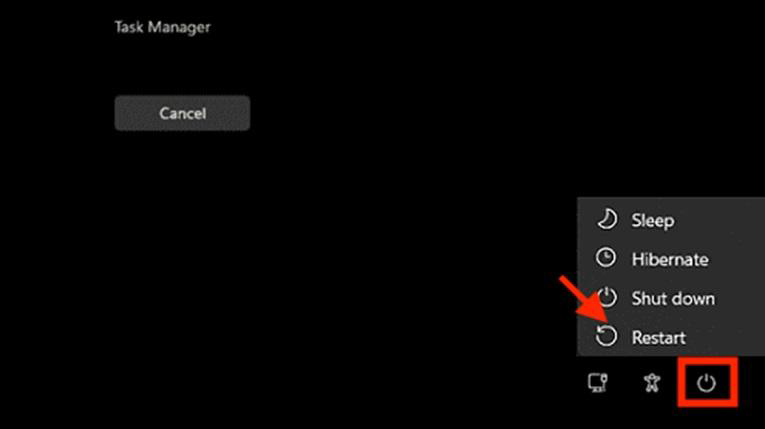
Using Ctrl + Alt + Delete
Press the keys, click the Power icon in the bottom-right corner, and choose Restart.
Using Task Manager
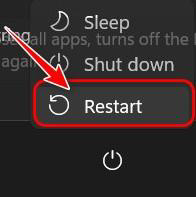
Close open browsers, then restart through the Start menu or Power icon.
The Most Important Reminder: Stay Calm
Scammers rely on fear and urgency. Taking a moment to breathe and think is often the best protection. If something doesn’t feel right:
• Reboot your computer, or
• Contact us immediately.
We would much rather answer a quick question than see you deal with a scam.
Thank you for trusting Ultimate IT Guys with your security needs. Keeping you safe, secure, and productive is our mission.